Microsoft recently introduced some updates to a few of their most popular PowerShell modules for Microsoft 365 administrators: Microsoft Graph, MicrosoftTeams and ExchangeOnline. Obviously these modules are developed by different teams and therefore sometimes use different versions of shared components/assemblies such as Microsoft.Identity.Client.dll or Microsoft.IdentityModel.Abstractions.dll. This can lead to very frustrating errors when you’re trying to connect to multiple Microsoft 365 services using their respective PowerShell modules.
WAM (Web Account Manager)
One thing these recent updates have in common is that they all switched to using WAM as their default authentication broker. If you’re only using one account to connect to M365 admin services, you might like that change. If you work in consulting and need to connect to lots of different tenants using different accounts, chances are that you won’t like it so much as it will require you to either add the account to Windows itself or sign in every single time you connect.
Versions that introduced WAM as default
Disable WAM
For now, these modules still have a DisableWAM or DisableLoginByWam switch param or automatically fall back to interactive browser authentication which allows you to sign in in most cases. However, if you use Conditional Access Token Protection it only works when using WAM. Otherwise you’ll be greeted by an error message that the sign in was blocked.
Error Messages you Might Encounter
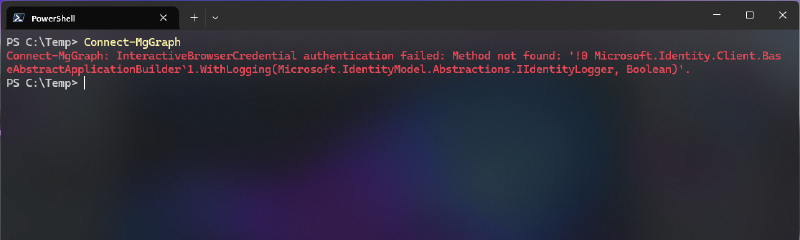
Depending on which module you try to sign in first when you have a set of incompatible authentication libraries installed, the error messages will look something like this:
Connect-MgGraph after Connect-ExchangeOnline:
1
| Connect-MgGraph: InteractiveBrowserCredential authentication failed: Method not found: '!0 Microsoft.Identity.Client.BaseAbstractApplicationBuilder`1.WithLogging(Microsoft.IdentityModel.Abstractions.IIdentityLogger, Boolean)'.
|
Connect-MgGraph before Connect-ExchangeOnline:
 1
 2
 3
 4
 5
 6
 7
 8
 9
10
11
12
13
14
15
| Error Acquiring Token:
System.NullReferenceException: Object reference not set to an instance of an object.
at Microsoft.Identity.Client.Platforms.Features.RuntimeBroker.RuntimeBroker..ctor(CoreUIParent uiParent, ApplicationConfiguration appConfig, ILoggerAdapter logger)
at Microsoft.Identity.Client.Broker.BrokerExtension.<>c.<AddRuntimeSupport>b__3_0(CoreUIParent uiParent, ApplicationConfiguration appConfig, ILoggerAdapter logger)
at Microsoft.Identity.Client.PlatformsCommon.Shared.AbstractPlatformProxy.CreateBroker(ApplicationConfiguration appConfig, CoreUIParent uiParent)
at Microsoft.Identity.Client.Internal.Requests.InteractiveRequest.FetchTokensFromBrokerAsync(String brokerInstallUrl, CancellationToken cancellationToken)
at Microsoft.Identity.Client.Internal.Requests.InteractiveRequest.GetTokenResponseAsync(CancellationToken cancellationToken)
at Microsoft.Identity.Client.Internal.Requests.InteractiveRequest.ExecuteAsync(CancellationToken cancellationToken)
at Microsoft.Identity.Client.Internal.Requests.RequestBase.<>c__DisplayClass11_1.<<RunAsync>b__1>d.MoveNext()
--- End of stack trace from previous location ---
at Microsoft.Identity.Client.Utils.StopwatchService.MeasureCodeBlockAsync(Func`1 codeBlock)
at Microsoft.Identity.Client.Internal.Requests.RequestBase.RunAsync(CancellationToken cancellationToken)
at Microsoft.Identity.Client.ApiConfig.Executors.PublicClientExecutor.ExecuteAsync(AcquireTokenCommonParameters commonParameters, AcquireTokenInteractiveParameters interactiveParameters, CancellationToken cancellationToken)
at Microsoft.Exchange.Management.AdminApiProvider.Authentication.MSALTokenProvider.GetAccessTokenAsync(String claims, String cmdletId)
OperationStopped: Object reference not set to an instance of an object
|
This happens despite having the latest non-preview version of each of the modules:
 1
 2
 3
 4
 5
 6
 7
 8
 9
10
11
12
13
14
15
| Get-PSResource -Scope AllUsers |
Where-Object Name -match 'Microsoft.Graph.Authentication|MicrosoftTeams|ExchangeOnlineManagement' |
Group-Object Name |
ForEach-Object {
$_.Group |
Sort-Object Version -Descending |
Select-Object -First 1
} | Format-Table Name, Version, Repository
# Output:
Name Version Repository
---- ------- ----------
ExchangeOnlineManagement 3.10.1 PSGallery
Microsoft.Graph.Authentication 2.39.0 PSGallery
MicrosoftTeams 7.9.0 PSGallery
|
What Causes the Incompatibility Errors?
This command shows that the latest version of Graph, Teams and Exchange PowerShell modules are all using different versions of the bundled identity broker:
 1
 2
 3
 4
 5
 6
 7
 8
 9
10
11
| $Modules=@('C:\Program Files\PowerShell\Modules\MicrosoftTeams\7.9.0','C:\Program Files\PowerShell\Modules\Microsoft.Graph.Authentication\2.39.0','C:\Program Files\PowerShell\Modules\ExchangeOnlineManagement\3.10.1'); Get-ChildItem $Modules -Recurse -Include Microsoft.Identity.Client.dll,Microsoft.IdentityModel.Abstractions.dll | % { [pscustomobject]@{Module=$_.FullName -replace '^C:\\Program Files\\PowerShell\\Modules\\([^\\]+\\[^\\]+).*','$1';File=$_.Name;Version=[Reflection.AssemblyName]::GetAssemblyName($_.FullName).Version} } | Sort-Object Module,File,Version -Unique | Format-Table -AutoSize
# Output:
Module File Version
------ ---- -------
ExchangeOnlineManagement\3.10.1 Microsoft.Identity.Client.dll 4.83.1.0
ExchangeOnlineManagement\3.10.1 Microsoft.IdentityModel.Abstractions.dll 8.19.2.0
Microsoft.Graph.Authentication\2.39.0 Microsoft.Identity.Client.dll 4.82.1.0
Microsoft.Graph.Authentication\2.39.0 Microsoft.IdentityModel.Abstractions.dll 8.18.0.0
MicrosoftTeams\7.9.0 Microsoft.Identity.Client.dll 4.82.0.0
MicrosoftTeams\7.9.0 Microsoft.IdentityModel.Abstractions.dll 8.14.0.0
|
Working Versions to Connect to Graph, Teams and Exchange Simultaneously
As far as I know, this only applies to delegated authentication. I haven’t tested these version with app auth only but from my experience, there’s usually less problems with non-interactive sign ins.
Of course you need to make sure that you have all of the specific versions installed:
1
2
3
| Install-PSResource MicrosoftTeams -Version 7.9.0 -Scope AllUsers
Install-PSResource Microsoft.Graph.Authentication -Version 2.35.1 -Scope AllUsers
Install-PSResource ExchangeOnlineManagement -Version 3.9.2 -Scope AllUsers
|
Note: You may also install the full Graph SDK using Install-PSResource Microsoft.Graph -Version 2.35.1 -Scope AllUsers.
Checking the DLL Versions again
 1
 2
 3
 4
 5
 6
 7
 8
 9
10
11
| $Modules=@('C:\Program Files\PowerShell\Modules\MicrosoftTeams\7.9.0','C:\Program Files\PowerShell\Modules\Microsoft.Graph.Authentication\2.35.1','C:\Program Files\PowerShell\Modules\ExchangeOnlineManagement\3.9.2'); Get-ChildItem $Modules -Recurse -Include Microsoft.Identity.Client.dll,Microsoft.IdentityModel.Abstractions.dll | % { [pscustomobject]@{Module=$_.FullName -replace '^C:\\Program Files\\PowerShell\\Modules\\([^\\]+\\[^\\]+).*','$1';File=$_.Name;Version=[Reflection.AssemblyName]::GetAssemblyName($_.FullName).Version} } | Sort-Object Module,File,Version -Unique | Format-Table -AutoSize
# Output:
Module File Version
------ ---- -------
ExchangeOnlineManagement\3.9.2 Microsoft.Identity.Client.dll 4.74.1.0
ExchangeOnlineManagement\3.9.2 Microsoft.IdentityModel.Abstractions.dll 8.14.0.0
Microsoft.Graph.Authentication\2.35.1 Microsoft.Identity.Client.dll 4.78.0.0
Microsoft.Graph.Authentication\2.35.1 Microsoft.IdentityModel.Abstractions.dll 8.15.0.0
MicrosoftTeams\7.9.0 Microsoft.Identity.Client.dll 4.82.0.0
MicrosoftTeams\7.9.0 Microsoft.IdentityModel.Abstractions.dll 8.14.0.0
|
As you can see, these versions still don’t have identical versions of the bundled DLL files but if they are imported in a specific order it works nonetheless.
Import and Connect in the Correct Order
Once you have the working combination of module versions installed, you also need to load the modules/connect to the services in the correct order. I’ve created a small function and added it to my PowerShell $profile.
 1
 2
 3
 4
 5
 6
 7
 8
 9
10
11
12
| function Import-M365Modules {
param (
)
Import-Module MicrosoftTeams -RequiredVersion 7.9.0
Import-Module Microsoft.Graph.Authentication -RequiredVersion 2.35.1
Import-Module ExchangeOnlineManagement -RequiredVersion 3.9.2
Write-Host "Connect in the following order: Connect-MicrosoftTeams, Connect-MgGraph, Connect-ExchangeOnline" -ForegroundColor Cyan
}
|
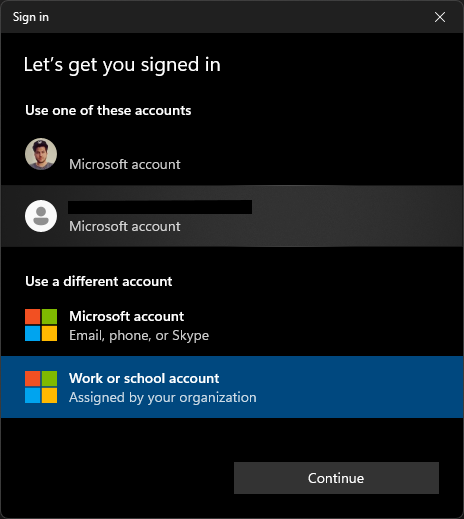
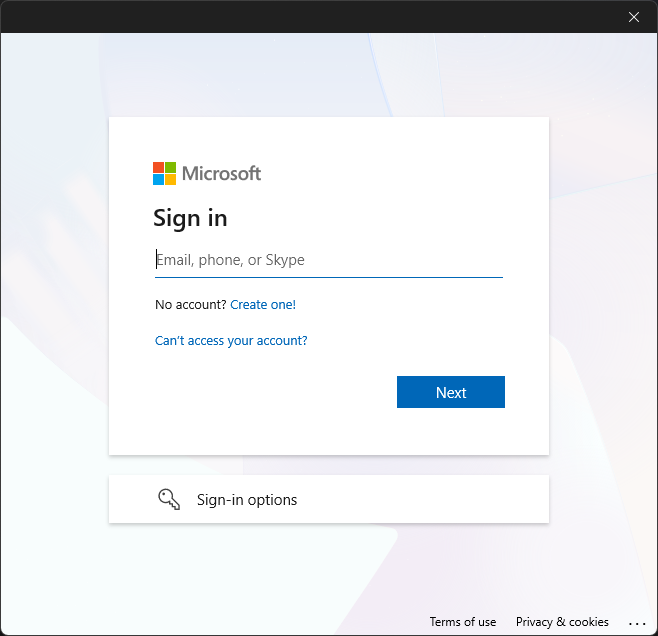
Despite all of them using WAM, the sign in dialog for Graph still looks different to Teams and Exchange.
That’s it. If you do that you will be able to continue to work and manage Teams, Exchange and Entra ID/Graph all from the same PowerShell session using interactive sign in and Conditional Access Token Protection.
 1
 2
 3
 4
 5
 6
 7
 8
 9
10
11
12
13
14
15
16
17
18
19
20
| Get-CsTenant | Select-Object ServiceInstance
# Output:
ServiceInstance
---------------
MicrosoftCommunicationsOnline/EMEA-2E-S2
Get-MgContext | Select-Object AppName, AuthType, WamEnabled
# Output:
AppName AuthType WamEnabled
------- -------- ----------
Microsoft Graph Command Line Tools Delegated True
Get-ConnectionInformation | Select-Object State, ConnectionUri, TokenStatus
# Output:
State ConnectionUri TokenStatus
----- ------------- -----------
Connected https://outlook.office365.com Active
|
I hope this helps you save some time and spares you the trouble of going through testing all the different version combinations yourself.